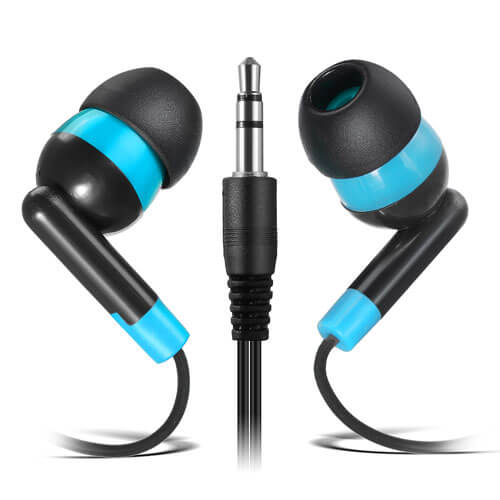


-
Muti Colors

-
Mixed Color
-
White
-
Blue
-
Blue/White


-
Muti Colors
-
Assorted Color
-
Mixed Color


Best Headphones for School Computer Labs: The 2026 Buyer's Guide
Computer lab headphones have a lot in common with pens. They disappear, they break at the worst possible moment, and everyone assumes someone else is responsible for them.
A school computer lab is not a classroom with more computers. It's a high-density, high-turnover environment where 24 students rotate through 24 devices every 45 minutes. The headphones have to survive that rhythm — and so does the IT coordinator who has to replace them.
Here's what to look for when buying headphones for a school computer lab, and how the KEEWONDA 24-Pack fits the way labs actually operate.
Why Computer Lab Headphones Are a Different Purchase
A classroom set of headphones might serve one group of students for a full year. A computer lab set serves every grade level, every class, and every device in the building.
That changes the requirements:
- Plug-and-play reliability — no pairing, no charging, no driver installation
- Fast distribution and recovery — students need headphones at the start of class and the lab aide needs them back at the end
- Cable and desktop management — long, tangled cables turn a lab desk into a knot
- Asset tracking — color coding and bagging make it obvious when a unit goes missing
- Hygiene at scale — shared equipment needs a practical cleaning and storage system
- Spare management — a lab cannot pause a lesson because one headphone has a loose wire
The Computer Lab Headphone Checklist
① Wired 3.5mm connection — the default
A computer lab is the last place you want Bluetooth. Pairing 24 headphones to 24 Chromebooks is not a lesson plan. It's a troubleshooting session with a clock running.
A wired 3.5mm jack works immediately with Chromebooks, Windows laptops, desktop PCs, iPads, and most lab devices. No pairing mode. No charging. No “why isn't this working?” tickets.
USB-C caveat: Some newer devices may only have USB-C ports. In that case, a 3.5mm-to-USB-C adapter is usually cheaper and more flexible than buying USB-C headphones for every station. For labs with mixed device fleets, standardizing on 3.5mm plus a few adapters is the practical move.
② Hardware-based 85dB volume limit
Computer labs are loud. Students turn up the volume to hear over the room. That's exactly when volume safety matters.
A hardware 85dB limit is fixed inside the headphone, not in the device settings. Students can't override it. Teachers don't need to check 24 volume sliders before a lesson. Every unit behaves the same way.
For a deeper explanation of hardware vs. software limits, see: Why 85dB Volume-Limited Headphones Are Non-Negotiable for K-12.
③ No microphone — for most computer lab use cases
Most computer lab work is listening: reading apps, language practice, video instruction, research, and online assessments that use audio for instructions.
A no-mic headphone has fewer components to break, no microphone permission prompts on shared devices, and one less thing for students to fiddle with.
Caveat: If your computer lab doubles as a language lab or video conferencing room, you need a headset with a microphone. The KEEWONDA 24-Pack is a no-mic headphone set. We'd rather tell you that clearly than sell you the wrong tool for a speaking assessment.
④ Durability for high-density use
Computer lab headphones get plugged in, unplugged, stretched, dropped, and pulled by the cable — often by students who are in a hurry to get to the next thing.
Look for:
- A solid headband rather than a thin wire frame
- Reinforced hinge points where the ear cup meets the headband
- A tangle-free cable that won't knot on a desk
- A 3.5mm plug that can survive repeated insertion
⑤ Individually bagged for lab hygiene
A computer lab may serve hundreds of students per week. Shared headphones need a hygiene system that works at that volume.
Individually bagged headphones let lab staff:
- Hand out a sealed unit at the start of class
- Store unused units without cross-contact
- Replace one failed unit without unsealing the whole set
- Count inventory by counting sealed bags
For a deeper look at why bagging matters, see: School Headphone Hygiene: Why Individually Bagged Matters.
⑥ Color coding for station assignment
A computer lab is a grid. Headphones should match the grid.
Four-color coding — Black, Orange, Green, Cyan — lets lab staff assign a color per row, per station group, or per class. At the end of the period, a quick visual scan tells you whether every color group is back.
This is the computer lab equivalent of a seating chart. It doesn't stop every disappearance, but it makes the missing unit obvious before the next class starts.
⑦ Cable length and desktop management
A 1.2m cable is long enough for a student to lean back at a desktop, short enough to avoid becoming a tripwire. Tangle-free cable design matters more in a lab than in a classroom because the cable is plugged and unplugged multiple times a day.
If your lab desks have cable management trays, 1.2m is usually the right length. If students use laptops on deep tables, measure the distance before ordering.

How the KEEWONDA 24-Pack Fits Computer Lab Use
| Computer Lab Requirement | KEEWONDA 24-Pack |
|---|---|
| Wired 3.5mm connection | ✅ Standard 3.5mm jack |
| 85dB hardware volume limit | ✅ Fixed on every unit |
| No mic (listening-focused labs) | ✅ No microphone |
| Individually bagged | ✅ Each headphone sealed in hygienic bag |
| Color coding | ✅ Black / Orange / Green / Cyan (6 each) |
| Tangle-free cable | ✅ 1.2m tangle-free |
| Shelf-ready storage | ✅ Corrugated bulk box |
| Spare units | ✅ 24 units = full lab set + spares |
| Multi-device compatibility | ✅ Chromebooks, Windows, iPad, desktop |
Computer Lab vs. Classroom vs. Testing Center
| Requirement | Classroom Set | Testing Center | Computer Lab |
|---|---|---|---|
| Primary use | Reading groups, apps | High-stakes assessments | Daily device work |
| Turnover | One class | Testing windows | Every period |
| Bluetooth risk | Low | Not allowed | High (pairing chaos) |
| Cable management | Moderate | Moderate | High |
| Hygiene frequency | Daily | Per session | Every period |
| Asset tracking | Helpful | Important | Critical |
| Mic needed? | Sometimes | Sometimes | Rarely |
| Spare ratio | 10–15% | 10–15% | 15–20% |
The computer lab has the highest turnover and the highest disappearance risk. That's why color coding and individually bagged spares matter more here than anywhere else.
How Many Headphones Does a Computer Lab Need?
Use this formula:
Lab stations × 1.2 + 15% spares = total headphones needed
The 1.2 multiplier accounts for units that are in use, units being cleaned, and units that are temporarily missing. The 15% spare covers breakage and the inevitable “it was here yesterday” situation.
For a lab with 24 stations:
- 24 × 1.2 = 28.8, round up to 29
- 29 × 1.15 = 33.35, round up to 34
That means a 24-pack covers the base set, but a second 24-pack gives you a full lab plus 14 spares. For most schools, buying two 24-packs is cheaper than buying one 24-pack and then scrambling for individual replacements later.
For a more detailed calculation, see: How Many Headphones Does Your School Actually Need?
Managing Headphones Across Lab Stations
A computer lab needs a simple system. Here are three that work:
Option 1: Color-coded rows
Assign Black to Row 1, Orange to Row 2, Green to Row 3, Cyan to Row 4. At the end of class, each row captain returns their color group. Missing units are obvious immediately.
Option 2: Bag labels
Add a small sticker to each bag with a station number. Students pick up the bag for their station and return it to the same station. This is more work upfront but gives per-station accountability.
Option 3: Checkout board
A simple whiteboard with color magnets. When a headphone goes out, the magnet moves. When it comes back, the magnet returns. Low-tech, surprisingly effective.
The KEEWONDA 24-Pack supports all three because the units are individually bagged and color-coded. The bag is the checkout unit; the color is the tracking layer.
A Note on On-Ear vs. Over-Ear in Computer Labs
On-ear headphones are lighter, more portable, and easier to store in a lab cabinet. They also fit a wider range of head sizes without complex adjustment.
Over-ear headphones provide better passive isolation, which can help in a loud lab. But they're bulkier, harder to store, and often more expensive per unit.
For most computer labs, on-ear headphones with a fixed 85dB limit are the practical choice. If your lab is used for sustained audio editing or language immersion, over-ear may be worth the extra cost. We'd rather explain the trade-off than pretend one design fits every lab.
Frequently Asked Questions
Do these headphones work with Chromebooks?
Yes. The 3.5mm audio jack works with Chromebooks, Windows laptops, desktop PCs, iPads, and most computer lab devices.
Do they work with USB-C-only devices?
Not directly. You'll need a 3.5mm-to-USB-C adapter. For mixed device fleets, adapters are usually cheaper than buying USB-C headphones for every station.
Are these headphones noise-cancelling?
No. They are wired on-ear headphones with an 85dB volume limit. They do not have active noise cancellation.
Do they have a microphone?
No. The KEEWONDA 24-Pack is a no-mic headphone set. If your lab needs microphone input for language labs or video calls, you'll need a different model.
Can students override the 85dB limit?
No. The limit is hardware-based. Students can adjust device volume, but the headphone will not output beyond 85dB.
How many spares should a computer lab keep?
Plan for 15–20% spares. Computer labs have higher turnover and higher loss rates than classrooms.
How should we store headphones between classes?
Keep unused units sealed in their individual bags inside the shelf-ready corrugated box. Wipe ear cups between uses and return each unit to its bag.
Can we buy replacement units by color?
Yes. The color coding makes it easy to order a replacement in the right color, and the individually bagged packaging lets you store spares without unsealing the full set.
Final Thoughts: A Computer Lab Needs a System, Not Just a Box of Headphones
The best headphones for school computer labs are not the ones with the most features. They're the ones that plug in, work, survive the period, and come back in the right color.
The KEEWONDA 24-Pack is built around that reality: wired 3.5mm, fixed 85dB hardware limit, no mic, individually bagged, four-color coded, 1.2m tangle-free cable. One box. 24 headphones. Ready for the lab.
👉 Shop the KEEWONDA 24-Pack School Headphones
Equipping a computer lab or multi-lab building? Contact us for bulk pricing and multi-site shipping.
Related reading: